FIELD NOTES — INTERFACE
A factory that says why
Fabriore used to tell you that something was wrong and leave the why to you: a red ghost, a reject sound, a machine standing still somewhere behind you. Six changes to the interface today make the game explain itself, from a refused placement to a whole book of recipes.
We went through Fabriore's interface screen by screen this week, and read how other factory games solve the same problems. One pattern stood out. In a game seen from above you can watch the whole factory at once and spot the belt that has gone quiet. In first person you see one corner of it at a time. So each machine has to be able to explain itself, and the game has to tell you where to look.
Our interface was not good at that. Most of what it knew about why sat in a colour, a sound or a tooltip you could not reach while the mouse steered your view. Today's update changes six things. All the pictures were taken in the game, on the current world, at half past two in the afternoon.
A refused placement says why
Aim a building somewhere it cannot go and the ghost turns red. Until today that was all you got. Click anyway and you heard a reject sound. The game knew the reason, because it checks every spot before it lets you build, but it kept it to itself for most of them: something already standing there, rock in the way, the edge of the buildable land.
Now a warning appears just below the crosshair while the ghost is red: the reason in large type on a red-tinted plate, with a warning sign in front so it does not rely on colour alone. Clicking anyway shows the same words as a message. Both come from one list, so they always say the same thing.
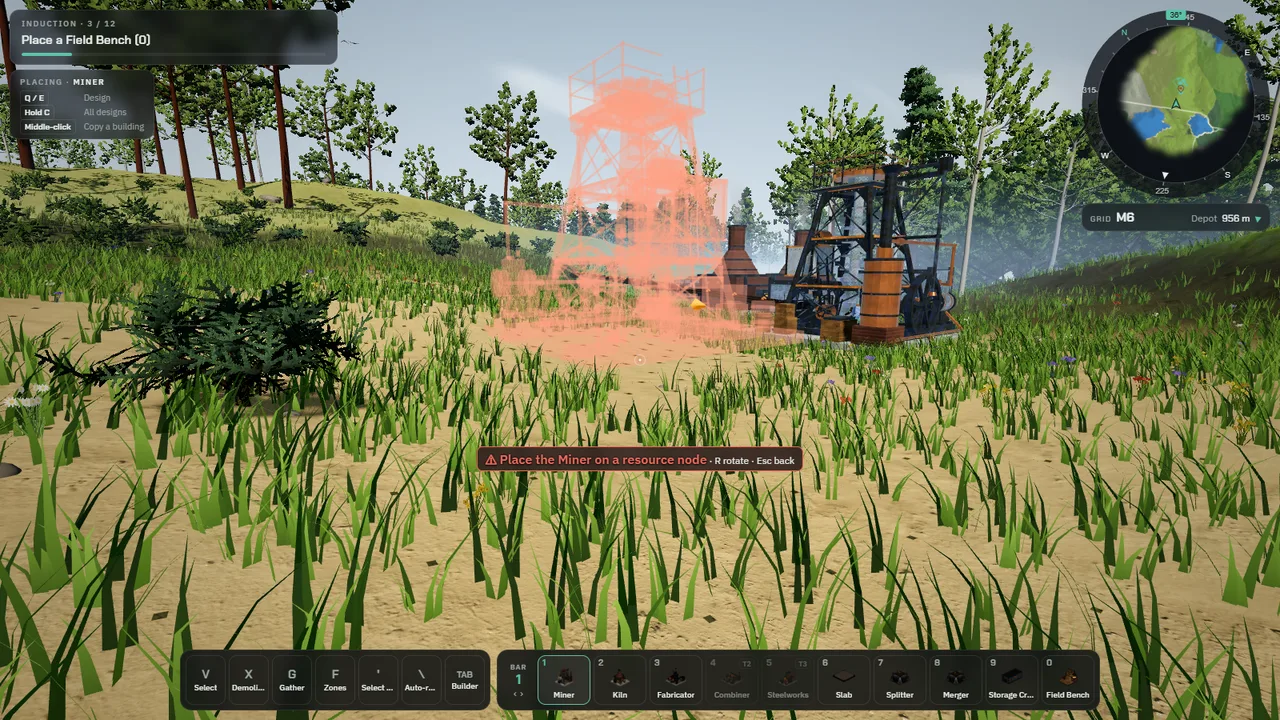
FIG. 1 — A Miner aimed beside the ore node instead of on it. The warning names the problem; rotate and cancel are still listed after it.
Stopped machines show themselves
A factory stops in three ways. A machine runs out of input, it fills up because nothing takes its output away, or the power grid cannot keep up. Before, the only place that counted them was a tile inside the menu.
Now a stopped machine carries a small sign above it, one shape per cause: a hollow triangle when it is waiting for input, a solid square when its output is full, a bolt when it lacks power. The signs wait ten seconds before they appear, so a machine that pauses for a moment between deliveries does not blink at you. A note under your current goal counts exactly the machines that carry a sign, with the key that opens the site overview listing them, and the minimap and the full map mark them too.
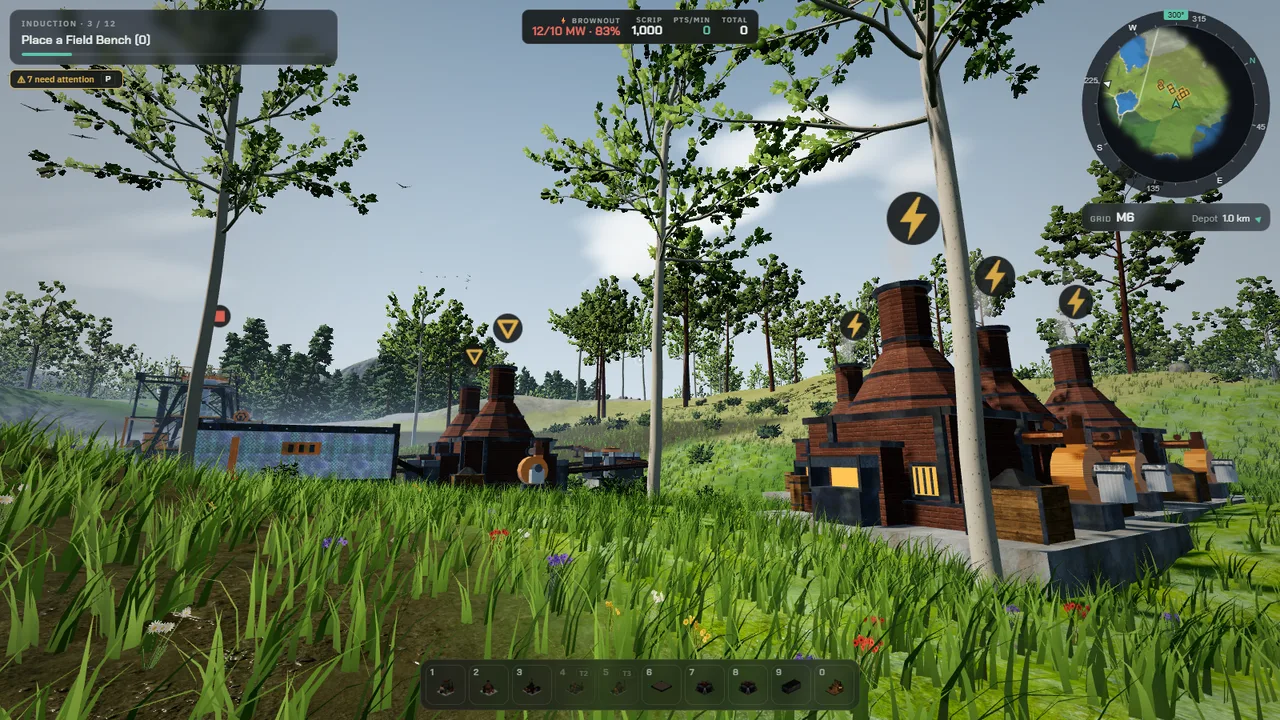
FIG. 2 — All three causes at once. The four Kilns on the right want 12 MW from a 10 MW grid (bolts). The belt from the Miner is cut, so the two Kilns behind it starve (triangles) and the Miner fills up (the small square on the far left). The note counts exactly the machines that carry a sign.
The first steps point the way
New players start with a short induction: twelve steps from mining ore by hand to a working line. The first steps send you to "the marked node". That mark was the same thing as selecting the node, and the very key the step asked you to press next picked a tool, which cleared the selection. The mark vanished the moment you followed the instruction.
The mark is now a waypoint of its own. A thin column of light stands on the node, visible over the trees from a hundred meters away, and fades as you arrive. The minimap carries a pin for it. It moves on with the steps and goes away when they no longer point anywhere. The steps also name the key you actually have the piece on, instead of the slot it sits in by default, and the step list can now be opened from the main menu in either HUD style.
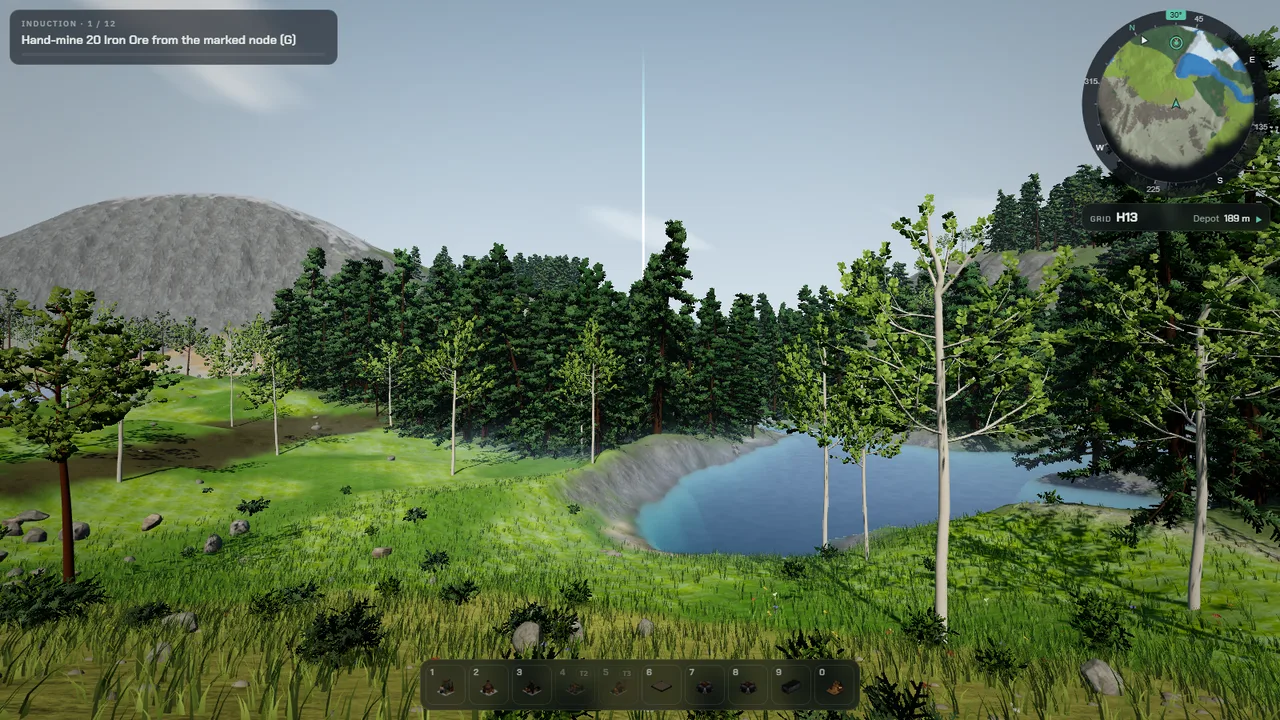
FIG. 3 — Step one of a fresh induction, a hundred meters from the iron node. The light column and the minimap pin show where to go.
A book of every recipe
Fabriore has grown to dozens of items, and until today there was no place to ask what an item is for. The new Codex answers two questions for every item: what makes it, and what uses it, with the rates per minute the game itself works with. Every item and machine in it is a link, and Back and Forward walk the trail you followed, with the buttons, Alt and the arrow keys, or the side buttons on a mouse.
Recipes you have not unlocked are listed too, dimmed, with what unlocks them. Hiding them would make it impossible to plan ahead. You open the Codex from the main menu, from the Field Bench and the Builder, or by clicking an item in a machine's panel. It is free for every player. The Builder's search uses the same index, so typing an item now also finds the machines that make it.
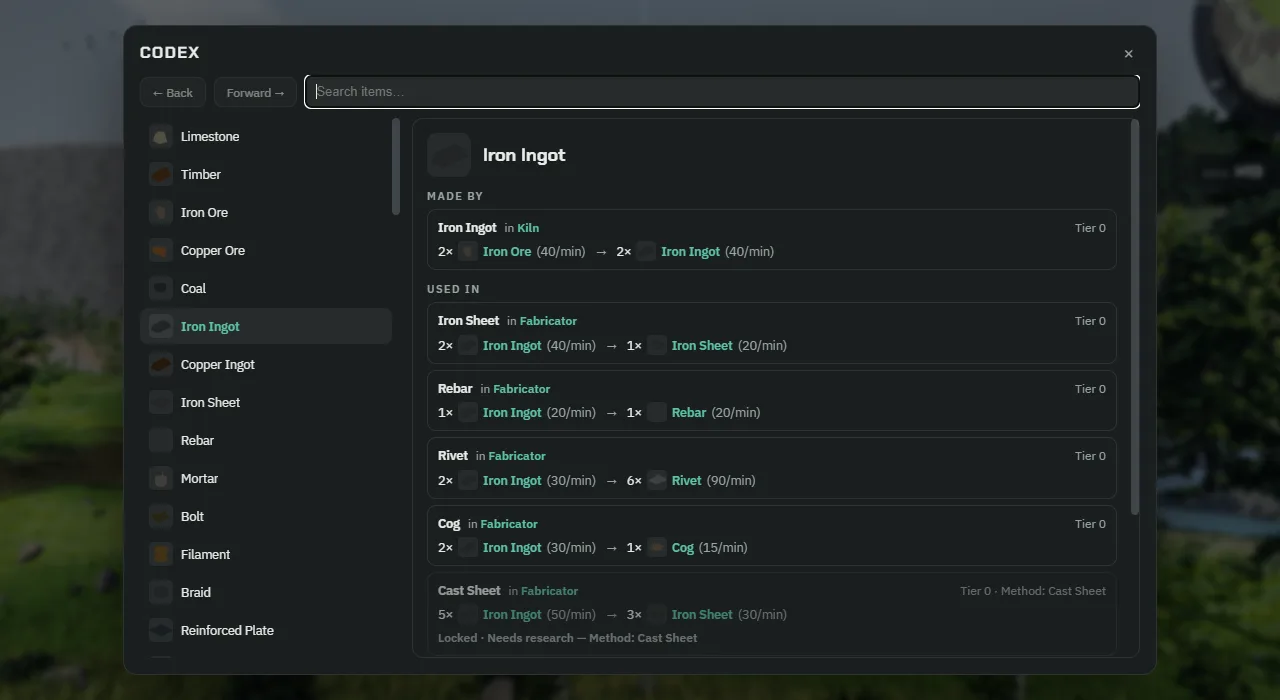
FIG. 4 — Iron Ingot in the Codex. The dimmed row at the bottom is a recipe that research unlocks.
Machines report what they actually make
A machine's panel used to show its recipe's rate, which is what it makes when it never waits. It did not show what it was making, and when it waited it said only "Starved". Now the panel names the input that is short and how much of it one batch needs, shows the real output per minute next to the recipe's, and turns that into an efficiency figure that goes amber below 90 percent. Belts show how much is passing over them and flag a run whose end is backed up.
The real rate is counted over the last minute of play, in five-second steps. It is kept beside the simulation, not inside it, so it never changes what the factory does and never goes into your save.
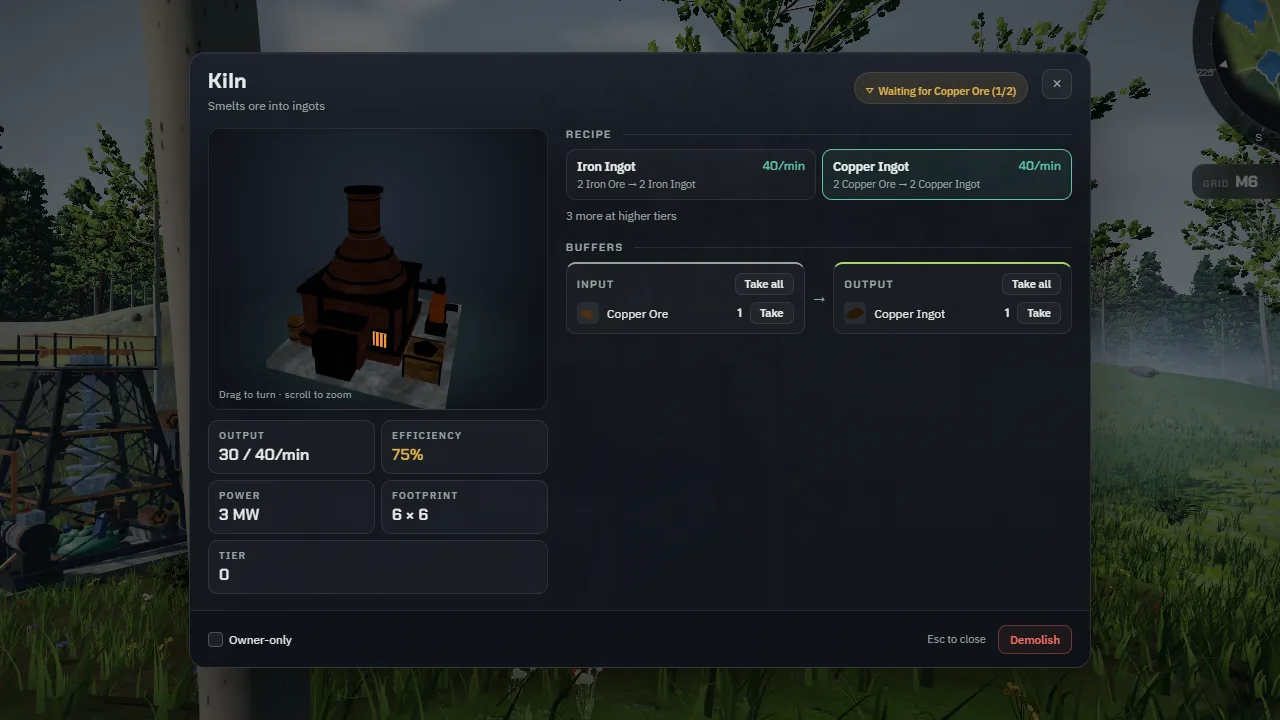
FIG. 5 — A Kiln fed 30 ore a minute through a splitter, three quarters of what its recipe can use. The panel says which input is short, by how much, and what that costs.
Copying a machine copies its recipe
Middle-click on a building already picked it up as the piece in your hand, with its look and its facing. Machines that craft lost their recipe on the way. Now the copy carries it: place the new machine and it starts on the same recipe as the one you copied, and the hint line shows which.
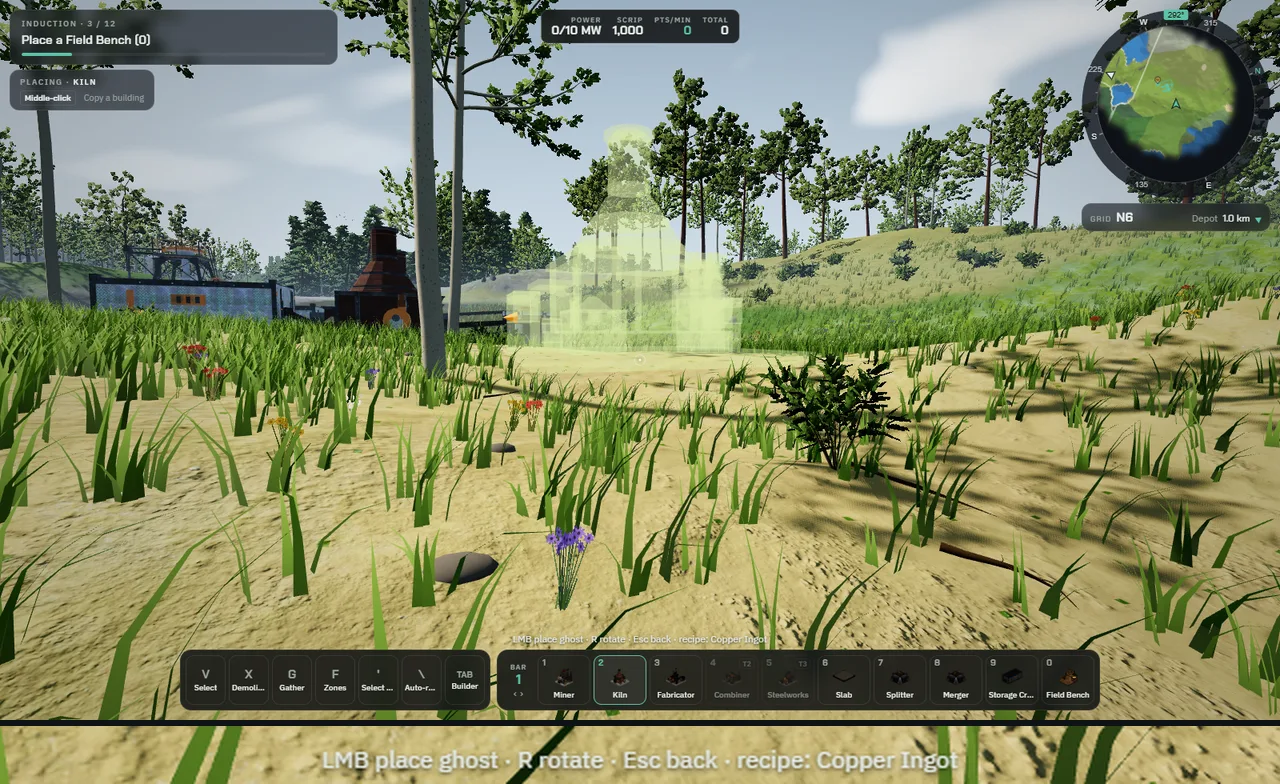
FIG. 6 — A Kiln copied with a middle-click from the line in the background. The strip below repeats the hint line at twice the size. The new Kiln will start making Copper Ingot as soon as it is built.
What is still rough
The interface text is small. Much of it is 12 pixels or less, and there is no setting yet to scale it up. Several keys cannot be changed, and Shift both runs and switches the hotbar. Messages fade after four seconds with no history to look back at. Undo and redo rebuild a machine without the recipe it was given after it was placed. These are next on the list.